 |
||||||
BonusLevel docs, FAQ | ||||||
| ||||||
How do I make a spoiler in my message?Simply like this: [spoiler]hidden text[/spoiler] How do I make a link to a level in my message?Simply like this: [lvlid=XX] where XX is the ID of the level, that you can get on the game page (illustration below). 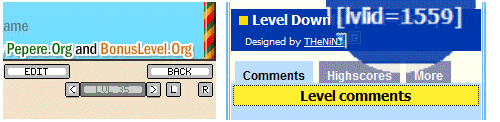
What does the colored blocks next to the level names mean ?
I've upldoaded a new level, when will it be evaluated ?It depends on the availability of the administrators. It can be 1 day, or several weeks before a level is evaluated. What are EXP points ?EXP points = Experience points. They represent your experience on the site. You earn EXP
What is "Rating power" ?Your rating power represents your influence on level ratings. It depends on your EXP points, your registration date, and on a secret algorithm to determine whether you rate fairly or not. What is a fair rating? It reflects the quality of the execution, the originality of the design, and the fun you had to play a level. The "secret algorithm" is mainly dedictated to struggle against people who give good ratings to friends and bad ratings to competitors. Can I be an administrator ?Yes but you might not ask us to become an administrator. The adminsitrators are selected and invited by the game author or the site administrators. Here are some of the characteristics needed to become an administrator : helpful, available, very good level designer, good (english) writing skills, mature behaviour. Evaluation is only a small part of the administrators duties (probably the most time consuming). The most significant part is to assist players, motivate new ones, assist designers, resolve conflicts, answer to questions and listen to opinions. The ultimate goal is not only preserve the high quality of the game and the community's but improve it with fresh new ideas. I'm creating a new level and when I click on LOCAL SAVE, a popup appears requesting to store information on my computer ?
Anyway, to change the storage limit, right click anywhere in the game, click on "Settings..." and click on the icon that looks like a folder. You can then adjust how much storage space is allowed for the website. Adobe explanations. Note that you can remove your local levels once you've uploaded them. Removing a local level will not remove the online level, and will free up space on your local Flash storage. I've accidentally uploaded a level that was not yet ready to be evaluated, what am I supposed to do now ?Just change the title of your level to "NOT READY" or "UNFINISHED" and upload it again. Once your level is ready, restore the original title. All my scores are gone!! Why?The scores normally don't get lost. Are you logged in? You must log in to be able to see them. I've completed the XYZ level and but my score has disappeared now! Why?The scores can be reset by an administrator when the level needs to be modified, its scores not being valid anymore. For the non official levels, we keep only the 100 best scores (to keep the database size safe). Your score can be reset because of being out of the 100 better scores. What is a community level ?As the creator of a level, you can authorize some members to edit your level (you do this from the level profile page). These "editors" will see the level below the "MY LEVELS / ONLINE" tab inside the game, and will be able to edit the level just like you. This is "community level". As the author of the level, you are still responsible for the final result, you get the EXP points and rewards for the level. What does the icons next to the user names mean ?
| DevelopersDeveloping games for BLCommunityAPI presentationCommon API (Game+Editor)Game APILevel editor APIDownloadsPlayers & designersFAQ |
|||||


 Yellow block: The level is official. It's now officially part of the game. It's always a top quality level that brings something new and fresh to the game.
 Blue block: The level is accepted. It's a good quality level that has been reviewed and approved by the administrators. It is featured on the front page and anyone can play it.
 Purple block: The level needs to be edited, usually because it hasn't been designed with enough care (messy, bad thumbnail, bad title).
 Red block: The level is rejected. The level has been reviewed by the administrators and they decided its quality is not good enough.
 Gray block: The level has not yet been evaluated.
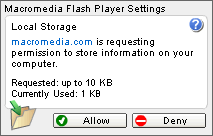 When you do a LOCAL SAVE, it saves to your hard drive and not to BonusLevel.org. Each level takes up several kilobytes of space. Flash puts a limit on the amount of space that each website is allowed to use; the default is 100 kilobytes. This popup is asking for more space because you've reached the size limit. Clicking "Allow" is the right choice and will NOT endanger your computer, because you can trust BonusLevel.org.
 This user is (or was) a tester for the current game.
 This user is a trusted member, and can edit his/her own approved levels for the current game.
 This user is a game administrator, and can approve or reject the levels for the current game.
 This user is the game author, a site administrator, or a game administrator level 2, and can manage the official levels for the current game.